Look Book Template Magazine Design: A Modern Layout
Understanding the Template's Core Appeal
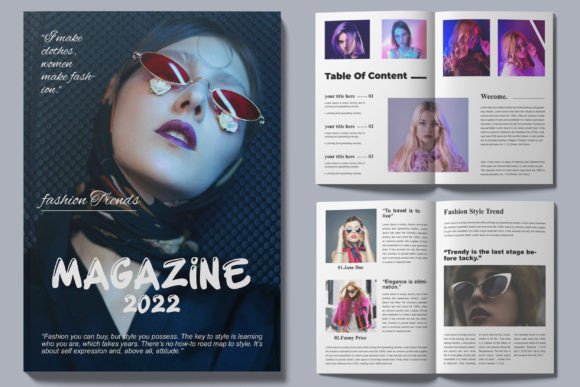
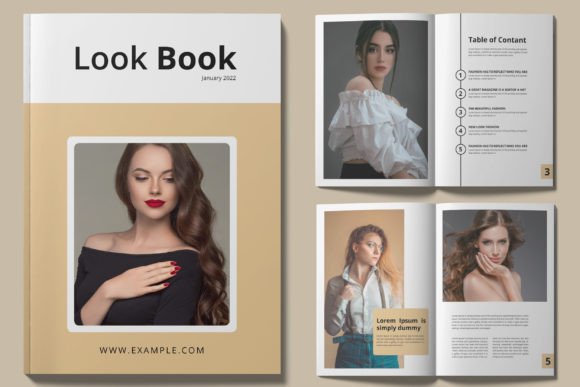
The Look Book Template Magazine Design is built for creators who need a professional result without starting from scratch. Its visual personality is clean, contemporary, and confident. The layout uses generous white space, structured grids, and a restrained color palette to let your content take center stage. It doesn't shout; it presents. This makes it particularly effective for fashion, lifestyle, art, and product showcases where the imagery is the star. The template's style leans toward modern minimalism, avoiding ornate decorations in favor of strong typographic hierarchy and crisp, aligned elements. Its overall appeal is one of polished simplicity—it looks expensive and intentional, even if you're a small business owner or a solo entrepreneur putting together your first brand magazine.
Where This Template Shines: Real-World Applications
This isn't just a digital mockup. The Look Book Template Magazine Design is a practical tool for a wide range of projects. For entrepreneurs and small business owners, it's ideal for creating lookbooks, product catalogs, or investor presentations that communicate professionalism. Marketers and content creators can use it to produce downloadable guides, lead magnets, or branded PDFs that stand out in crowded inboxes. Bloggers and publishers will find it transforms long-form articles or photo essays into a cohesive, magazine-style reading experience, perfect for repurposing blog content into a premium newsletter or print-ready booklet.
Its utility extends to brand identity projects. A well-designed template can serve as the foundation for a brand's editorial style guide, ensuring visual consistency across all materials. For print and digital use, the A4 paper size and CMYK color scheme mean it's ready for professional printing, while its structured layers also export cleanly for digital distribution. The clean design makes it adaptable—swap the placeholder text and images for your own, and you have a custom piece that aligns with your existing brand identity without the cost of a full custom design.
Practical Guidance for Choosing and Using the Template
Before diving in, evaluate if this design asset fits your project's needs. Consider its strengths: it excels at presenting high-quality visuals and clear, organized information. If your project requires a highly ornate, vintage, or grunge aesthetic, this minimalist approach might not be the best fit. However, for a professional, clean design, it's a strong contender.
One of its key features is that it is 100% editable and uses well-organized layers. This is crucial. A well-layered InDesign file allows you to easily change colors, swap images, adjust text blocks, and even modify the grid structure without breaking the entire layout. This level of control is what separates a basic template from a professional tool. The included help file documentation is your first stop—it will explain the file structure, how to use the color swatches, and where to find the free fonts used in the design.
Speaking of fonts, the template's modern typography is a significant part of its appeal. While the specific fonts are free and linked, understanding how they work is important. Typically, a template like this pairs a clean sans serif font for body copy with a more distinctive display font or serif font for headlines. This creates a clear visual hierarchy, guiding the reader's eye from the headline to the subheadings and then to the body text. When you customize, maintain this principle. If you decide to use your own premium font or creative font, test the font pairing thoroughly. Ensure the new typeface has the right weight and style to complement the existing layout without causing readability issues.
Finally, remember the practical steps. The instant download means you can start immediately. Use the fast and friendly customer service if you hit a snag—that's part of the value. Test a few pages first. Input your own content and see how it flows. Does the layout support your text length? Does it frame your images effectively? A good template should feel like a collaborator, not a constraint. The Look Book Template Magazine Design is built to be that collaborator, offering a structured, print-ready foundation that lets you focus on your message and your visuals, ensuring the final product enhances your brand perception and engages your audience.