Minimalist Pricing Table: A Clean Design Asset for Clarity
The Power of Clean, Vector-Based Design
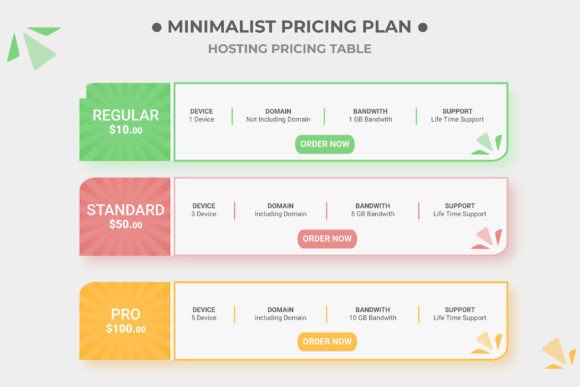
When you are building a landing page or a dedicated sales sheet, the pricing table is often the make-or-break element. It needs to communicate value instantly while remaining easy to scan. The Minimalist Pricing Table template we are looking at today addresses this challenge head-on. It is not just a static image; it is a fully constructed set of Illustrator vector shapes. This distinction is vital for anyone serious about their brand identity and web design. Because every element is a vector, you are not constrained by pixelation. You can resize this table to fit a massive billboard or shrink it down for a mobile screen without losing a single bit of sharpness. This kind of flexibility is what separates amateur projects from professional design assets.
The visual personality of this table is defined by restraint. It avoids the clutter that plagues so many pricing pages. You won't find unnecessary gradients or heavy drop shadows here. Instead, the design relies on solid geometry and negative space to guide the user's eye. This is the essence of modern typography and layout: letting the content breathe. For entrepreneurs and marketers, this means your potential customers can focus on the numbers and the features rather than getting distracted by the interface. It creates an immediate sense of trust because the layout feels organized and intentional.
Integrating this Template into Your Projects
One of the biggest hurdles with downloadable templates is the editing process. We have all downloaded a file only to find it locked in a confusing mess of layers. The Minimalist Pricing Table solves this with a fully organized layer panel. Whether you are a seasoned designer or a small business owner trying to do it yourself, this structure saves you time. You can change the colors to match your specific brand identity in seconds. If your brand uses a specific hex code for "Call to Action" buttons, applying it across the columns is intuitive because the file is set up for real-world use.
The file comes in standard Ai and EPS formats, making it compatible with Adobe Illustrator and many other vector editing software. It uses a CMYK color scheme right out of the box. This is a critical detail that many digital-only templates miss. If you are a publisher or a crafter who needs to move from digital to print—perhaps for a workshop brochure or a physical product catalog—this file is already print-ready. You do not need to convert color spaces and risk muddy results. The clean design ensures that whether it is viewed on a high-resolution Retina screen or printed on matte paper, the lines remain crisp.
Consider the versatility of this asset. A marketer might use it to A/B test different pricing structures on a landing page. A content creator could adapt it to compare different membership tiers for a Patreon or Substack community. The ability to modify columns means you aren't stuck with a "Basic, Pro, Enterprise" structure if your offering is different. You can add a fourth column for a "Free Trial" or remove one to simplify the decision-making process. This adaptability makes it a valuable piece in your library of design assets.
Practical Application and Workflow Efficiency
For those worried about typography, the template utilizes a free font. This is a practical choice for commercial projects. It removes the friction of tracking down expensive premium font licenses just to make a mockup work. However, because the text is editable, you have the freedom to swap it out. If your web design relies on a specific sans serif font for body text or a bold display font for headers, you can easily implement a font pairing that aligns with your existing style guide. The layout is robust enough to handle different type sizes without breaking the grid, which is the hallmark of good modern typography.
Let's talk about the workflow. The "Instant Download" feature means you can go from concept to execution immediately. If you are a blogger writing a post about your new service and realize you need a visual to explain the pricing tiers, you don't have to wait. You download, open the file, edit the text, and export. The help file documentation included is also a nice touch, offering guidance for those who might be less familiar with vector editing. It shows a level of customer care that goes beyond just selling a file; it is about ensuring the user succeeds with the product.
Ultimately, this Minimalist Pricing Table is a tool for clarity. In a digital landscape full of noise, offering your audience a clean, well-organized way to compare options is a competitive advantage. It respects the user's intelligence by presenting information logically. Whether you are designing a site for a client or building your own small business presence, having a reliable, 100% editable, and print ready pricing table template removes a significant barrier from your launch checklist. It allows you to focus on the strategy behind the pricing, rather than getting bogged down in the pixel-pushing of the design.